
RAID Calculator
Calculate raw capacity, usable storage, redundancy, storage efficiency, and fault tolerance for RAID 0, RAID 1, RAID 5, RAID 6, and RAID 10.
RAID Calculation Results
| RAID Level | |
|---|---|
| Total Raw Capacity | |
| Usable Capacity | |
| Redundancy Loss | |
| Storage Efficiency | |
| Fault Tolerance |
Step-by-Step Calculation
Supported RAID Levels
- RAID 0 – Striping for maximum capacity and performance, but no redundancy.
- RAID 1 – Mirroring for data redundancy and protection against a drive failure.
- RAID 5 – Distributed parity with protection against one drive failure.
- RAID 6 – Dual parity with protection against two drive failures.
- RAID 10 – Combines mirroring and striping for performance and redundancy.
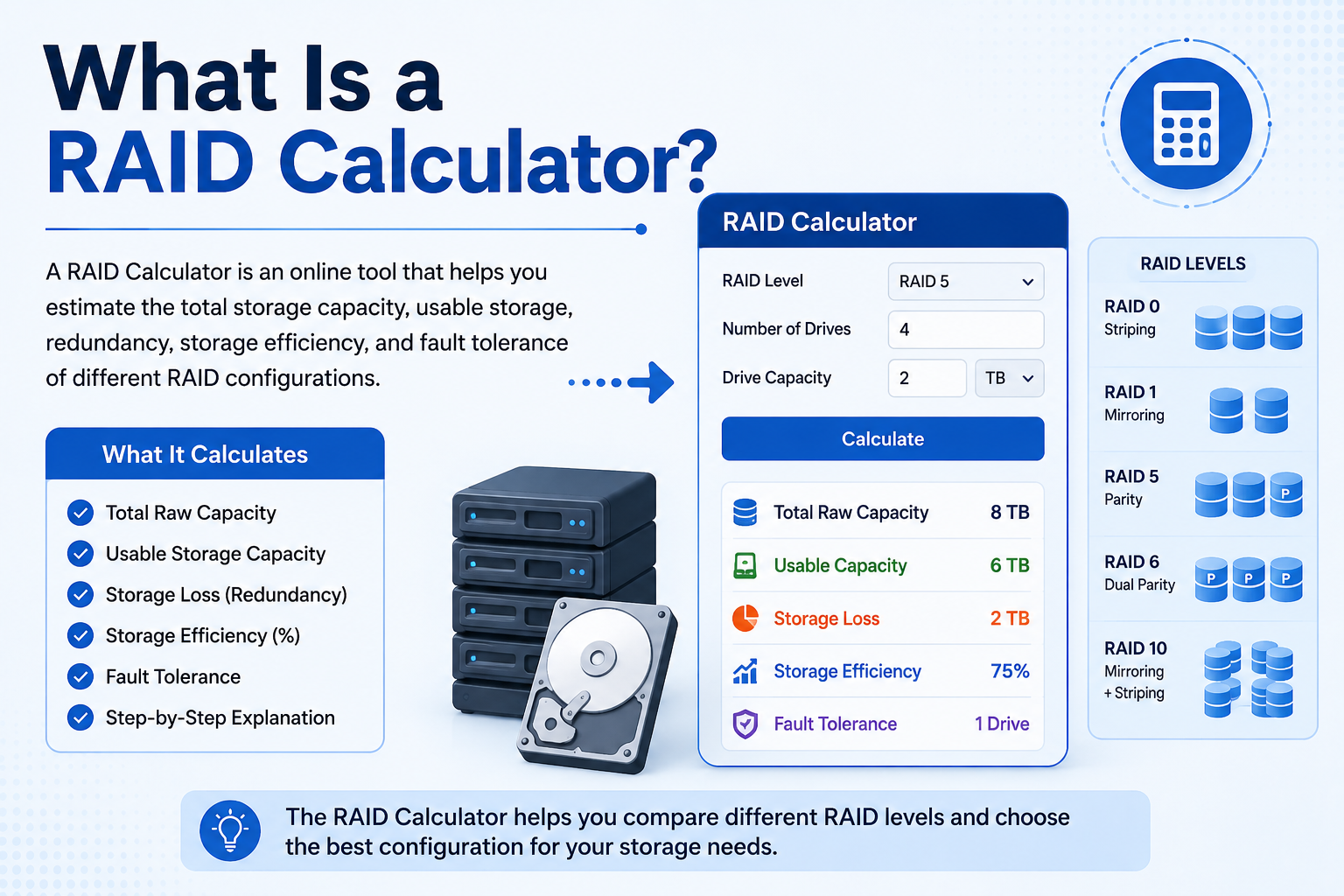
What Is a RAID Calculator?
A RAID Calculator is an online storage planning tool that helps you estimate the raw capacity, usable storage, redundancy, storage efficiency, and fault tolerance of a RAID array. Instead of calculating storage capacity manually, you can select a RAID level, enter the number of drives, enter the capacity of each drive, and instantly see how the storage is distributed.
RAID, or Redundant Array of Independent Disks, is commonly used to combine multiple physical drives into a logical storage system. Depending on the RAID level, the array may prioritize performance, redundancy, usable capacity, or a combination of these factors.
A RAID Calculator is useful when planning a NAS, home server, business server, workstation, database server, media storage system, or enterprise storage environment. It can help you understand how much storage you will actually have after mirroring or parity is taken into account.
What Does RAID Stand For?
RAID stands for Redundant Array of Independent Disks. RAID technology combines multiple physical storage drives into an array that can provide increased performance, redundancy, or both.
Different RAID levels use different methods to distribute and protect data. RAID 0 focuses on striping and performance, RAID 1 uses mirroring, RAID 5 and RAID 6 use parity, while RAID 10 combines mirroring and striping.
Understanding the difference between RAID levels is important because the same number of drives can provide very different amounts of usable storage depending on the selected configuration.
How Does a RAID Calculator Work?
This RAID Calculator uses three main inputs: the RAID level, number of drives, and capacity of each drive. The calculator first determines the total raw capacity and then applies the storage rules associated with the selected RAID configuration.
- Raw Capacity – The combined capacity of all installed drives.
- Usable Capacity – The estimated capacity available for data after RAID overhead.
- Redundancy Loss – Capacity used for mirroring or parity.
- Storage Efficiency – The percentage of raw capacity available for data.
- Fault Tolerance – The number or type of drive failures the configuration can tolerate.
RAID 0 Calculator
RAID 0 uses striping to distribute data across multiple drives. Because there is no mirroring or parity overhead, the usable capacity is approximately the combined capacity of all drives in the array.
RAID 0 can provide excellent performance and maximum storage efficiency, but it does not provide redundancy. If one drive fails, the RAID 0 array can become unavailable and data stored across the array may be lost.
For example, four 2 TB drives in RAID 0 provide approximately 8 TB of raw and usable capacity before other storage-system overhead.
RAID 1 Calculator
RAID 1 uses mirroring. Data is duplicated across the drives, providing redundancy if a drive fails. With a simple two-drive RAID 1 configuration, approximately 50% of the combined raw capacity is usable.
For example, two 2 TB drives provide approximately 4 TB of raw capacity but about 2 TB of usable RAID 1 capacity.
RAID 1 is commonly considered when data protection and straightforward recovery are more important than maximizing usable capacity.
RAID 5 Calculator
RAID 5 uses distributed parity. It requires at least three drives and reserves the equivalent capacity of one drive for parity.
The common capacity calculation for RAID 5 is:
Usable Capacity = (Number of Drives − 1) × Drive Capacity
For example, four 2 TB drives provide 8 TB of raw capacity. Under the standard RAID 5 capacity formula, approximately 6 TB is usable and approximately 2 TB is used for parity.
RAID 5 can be useful when you want a balance between usable storage and protection against a single drive failure.
RAID 6 Calculator
RAID 6 uses dual distributed parity and requires at least four drives. Its standard capacity calculation reserves the equivalent of two drives for parity.
The common RAID 6 capacity formula is:
Usable Capacity = (Number of Drives − 2) × Drive Capacity
For example, six 4 TB drives provide 24 TB of raw capacity. The standard RAID 6 capacity formula gives approximately 16 TB of usable capacity, with the equivalent of 8 TB reserved for dual parity.
RAID 6 can tolerate two drive failures, which makes it attractive for larger arrays where additional fault tolerance is important.
RAID 10 Calculator
RAID 10, also called RAID 1+0, combines mirroring and striping. It requires an even number of drives, with four drives being a common minimum configuration.
For an even number of equally sized drives, the basic capacity formula is:
Usable Capacity = Number of Drives ÷ 2 × Drive Capacity
For example, four 2 TB drives provide 8 TB of raw capacity and approximately 4 TB of usable capacity under the standard RAID 10 arrangement.
RAID 10 is often selected when both performance and redundancy are important. Its exact failure tolerance depends on which physical drives fail because the array is organized into mirrored pairs.
RAID Capacity Formulas
| RAID Level | Minimum Drives | Typical Capacity Formula | Fault Tolerance |
|---|---|---|---|
| RAID 0 | 2 | N × S | None |
| RAID 1 | 2 | S | 1 drive in a standard 2-drive mirror |
| RAID 5 | 3 | (N − 1) × S | 1 drive |
| RAID 6 | 4 | (N − 2) × S | 2 drives |
| RAID 10 | 4 | (N ÷ 2) × S | Depends on failed mirror pairs |
In these formulas, N represents the number of drives and S represents the capacity of each drive. These are simplified capacity calculations assuming equally sized drives and the standard RAID layout.
Raw Capacity vs. Usable Capacity
Raw capacity and usable capacity are not the same thing. Raw capacity is the combined advertised capacity of all drives installed in the array. Usable capacity is the portion that remains available for storing data after RAID redundancy or parity is considered.
| Raw Capacity | Usable Capacity |
|---|---|
| Total capacity of all drives. | Capacity available for data after RAID overhead. |
| Does not account for mirroring or parity. | Accounts for RAID redundancy. |
| Usually the larger number. | Depends on the selected RAID level. |
RAID Storage Efficiency
Storage efficiency shows how much of the raw capacity can be used for data. It can be calculated as:
Storage Efficiency = (Usable Capacity ÷ Raw Capacity) × 100
RAID 0 has approximately 100% capacity efficiency because no storage is reserved for redundancy. A standard two-drive RAID 1 configuration provides approximately 50% usable capacity because one copy of the data is mirrored to another drive.
RAID 5 and RAID 6 generally provide higher capacity efficiency as the number of drives increases because the parity overhead represents the equivalent of one or two drives respectively.
RAID Level Comparison
| RAID | Performance | Redundancy | Capacity Efficiency |
|---|---|---|---|
| RAID 0 | Very High | None | 100% |
| RAID 1 | Good | High | About 50% |
| RAID 5 | Good | 1 Drive | (N−1)/N |
| RAID 6 | Good | 2 Drives | (N−2)/N |
| RAID 10 | Very High | Mirror-dependent | About 50% |
Example RAID 5 Calculation
Suppose you have four hard drives, each with a capacity of 2 TB, and you want to configure RAID 5.
- Number of drives = 4
- Drive capacity = 2 TB
- RAID level = RAID 5
Raw Capacity = 4 × 2 TB = 8 TB
RAID 5 reserves the equivalent capacity of one drive for parity.
Usable Capacity = (4 − 1) × 2 TB = 6 TB
Redundancy Capacity = 8 TB − 6 TB = 2 TB
Storage Efficiency = 6 ÷ 8 × 100 = 75%
How to Use This RAID Calculator
- Select the RAID level you want to evaluate.
- Enter the number of drives in your array.
- Enter the capacity of each drive.
- Select GB or TB as the storage unit.
- Click the Calculate RAID button.
- Review the raw capacity, usable capacity, redundancy loss, efficiency, and fault tolerance.
Choosing the Right RAID Level
When to Consider RAID 0
RAID 0 may be considered when performance and maximum capacity are the main priorities and the data is backed up elsewhere. Because there is no redundancy, RAID 0 should not be treated as a data-protection solution.
When to Consider RAID 1
RAID 1 is useful when straightforward mirroring and redundancy are more important than maximum usable capacity. It is often suitable for smaller systems where a mirrored copy of data is desirable.
When to Consider RAID 5
RAID 5 provides a balance between usable capacity and protection against one drive failure. It may be considered for storage environments where capacity efficiency is important.
When to Consider RAID 6
RAID 6 provides additional parity compared with RAID 5 and can tolerate two drive failures. It can be useful for larger arrays where additional redundancy is a priority.
When to Consider RAID 10
RAID 10 is designed to combine striping performance with mirrored redundancy. It is commonly considered for workloads where performance and availability are both important.
Important RAID Planning Tips
- Use compatible drives with appropriate capacities and specifications.
- Check the RAID controller or NAS documentation before creating an array.
- Maintain regular backups even when RAID redundancy is enabled.
- Monitor drive health and replace failing drives promptly.
- Consider rebuild time when selecting a RAID level for large drives.
- Do not choose a RAID level based only on usable capacity.
- Consider workload, performance, redundancy, and future expansion together.
- Remember that RAID protects primarily against certain hardware failures; it does not protect against every type of data loss.
Who Can Use a RAID Calculator?
A RAID Calculator can be useful for anyone planning a multi-drive storage system. It is especially useful for:
- System administrators
- IT professionals
- Server administrators
- NAS users
- Home lab users
- Small businesses
- Database administrators
- Photographers and videographers
- Data centre teams
- Students learning storage technologies
Benefits of Using an Online RAID Calculator
- Calculates RAID capacity instantly.
- Reduces manual calculation errors.
- Shows raw and usable capacity.
- Explains redundancy overhead.
- Calculates storage efficiency.
- Helps compare RAID configurations.
- Useful for NAS and server planning.
- Works with both GB and TB inputs.
- Works on desktop, tablet, and mobile devices.
Common RAID Calculator Mistakes
Storage planning mistakes can lead to unexpected capacity or performance results. Some common mistakes include:
- Confusing raw capacity with usable capacity.
- Ignoring the minimum drive requirement for a RAID level.
- Assuming RAID automatically provides a backup.
- Ignoring parity or mirroring overhead.
- Using incompatible or unsuitable drives.
- Choosing RAID only according to maximum storage capacity.
- Failing to plan for drive replacement and rebuild time.
- Ignoring the specific requirements of the NAS or RAID controller.
Frequently Asked Questions About RAID
1. What is a RAID Calculator?
A RAID Calculator is an online tool that estimates raw storage capacity, usable capacity, redundancy loss, storage efficiency, and fault tolerance for common RAID configurations. It helps you understand how much storage will be available after RAID overhead is applied.
2. Which RAID level gives the most usable storage?
RAID 0 generally provides the highest usable capacity because it does not reserve storage for mirroring or parity. However, RAID 0 provides no drive-failure protection, so it should not be considered a redundancy solution.
3. How much usable storage does RAID 5 provide?
With equally sized drives, the standard RAID 5 capacity formula is (number of drives − 1) × drive capacity. For example, four 2 TB drives provide approximately 6 TB of usable RAID 5 capacity before other storage overhead.
4. How much storage does RAID 6 use for redundancy?
RAID 6 generally reserves the equivalent capacity of two drives for dual parity. Therefore, with equally sized drives, the standard usable capacity formula is (number of drives − 2) × drive capacity.
5. Does RAID replace backups?
No. RAID is not a replacement for backups. RAID can help keep an array operating when certain drive failures occur, but it cannot protect against accidental deletion, malware, ransomware, corruption, theft, fire, or other causes of data loss. Important data should have a separate backup.
6. How many drives are required for RAID 10?
RAID 10 normally requires at least four drives and uses an even number of drives in a standard mirrored-and-striped arrangement. The usable capacity is typically about 50% of the combined raw drive capacity.
7. Can RAID 5 survive a drive failure?
A standard RAID 5 array can tolerate one failed drive because parity information is distributed across the array. After a drive failure, the array should be repaired or rebuilt as soon as practical according to the storage system's procedures.
8. Can RAID 6 survive two drive failures?
Yes. Standard RAID 6 uses dual parity and is designed to tolerate the failure of two drives simultaneously while maintaining access to the array, assuming the RAID implementation is functioning correctly.
9. What is RAID storage efficiency?
RAID storage efficiency is the percentage of raw capacity that is available for storing data. It can be calculated as usable capacity ÷ raw capacity × 100. RAID 0 has approximately 100% capacity efficiency, while RAID 1 and RAID 10 generally provide about 50% usable capacity in standard configurations.
10. Can I use different-sized drives in RAID?
RAID behavior with different-sized drives depends on the RAID implementation, controller, NAS, and configuration. In many systems, the usable capacity is constrained by the smallest drive or by the specific array rules. For predictable capacity calculations, this calculator assumes equally sized drives.
11. Is RAID 10 faster than RAID 5?
RAID 10 can offer strong performance because it combines striping with mirroring and generally avoids the same parity-writing process used by RAID 5. Actual performance depends on the hardware, workload, controller, drives, and implementation.
12. What is the difference between raw and usable RAID capacity?
Raw capacity is the combined advertised capacity of all drives. Usable capacity is the amount available for data after the RAID configuration accounts for mirroring or parity. Therefore, usable capacity is normally lower than raw capacity for redundant RAID levels.
Conclusion
A RAID Calculator makes storage planning easier by showing how different RAID configurations affect raw capacity, usable storage, redundancy, storage efficiency, and fault tolerance. RAID 0, RAID 1, RAID 5, RAID 6, and RAID 10 each use storage differently, so selecting a RAID level should be based on the balance between performance, capacity, availability, and data protection that your system requires.
Whether you are planning a NAS, home lab, business server, workstation, database environment, or larger storage array, calculating usable capacity before purchasing drives can help you avoid unexpected storage limitations. This calculator provides a quick way to compare common RAID configurations using your own drive count and drive capacity.
Remember that RAID should be considered part of a broader storage strategy rather than a replacement for backups. A well-planned system should account for drive failures, rebuilds, backups, monitoring, performance requirements, and future storage growth.
Use the RAID Calculator above to compare configurations, estimate usable storage, understand redundancy overhead, and make more informed decisions when planning your next RAID storage system.